Showing posts with label CRM Integration. Show all posts

10 December 2009

Microsoft Dynamics CRM 4 Integration Unleashed

Last month, Pearson(Sams Publishing) sent me a book to review. It's the 《Microsoft Dynamics CRM 4 Integration Unleashed》written by Marc and Rajya.

The book covers many areas that you can think of about the CRM 4 integration: Infrastructure Design; Extending CRM; Silverlight Integration; SharePoint Integration; BI; Digital Phone Integration; Master Data Management; Social Network Integration; Mapping Technologies; CRM 4.0 Accelerators; SCOM; VSTS; BizTalk Integration; Azure; Scribe Integration and more.

I really like the fact that the book provides some real world examples and step by step through integrating Dynamics CRM with other products/technologies, it's helpful for CRM architects and developers to get an overview or even in details about CRM Integration.

28 November 2008

Code: CRM 4.0 Dashboard Intergate with FusionCharts

I have been asked many times through email/blog for sharing code about the CRM Dashboard with FusionChart integration. So I decide to extract some code and build a demo project to share, it's a simple work for demo, so please don't expect too much. :)

The demo dashboard supports:
• CRM 4.0, multi-tenants(one URL for different organizations);
• IFD and On-Premise deployment;
• CRM user security(users only see relevant data which their have privileges)

You may deploy the solution under ISV folder, you also need to change sitemap to show the Dashboard:


Download the solution

19 October 2008

Ways to build up a CRM dashboard

There are servel ways to build up a dashboard to integrate with Dynamics CRM. Let's take a look(projects I have done):

1. Windows Sharepoint Service (WSS 3.0) + Office web part
In the previous version of WSS(v2.0), there is a free Office 2003 Add-in: Web Parts and Components, which is not available for WSS 3.0, however you can still add it manually. It's easy to use and config, but not flexible enough, it also requires the client PC has to have Office 2003/2007 software intsalled to see the graphic.


2. Windows Sharepoint Service (WSS3.0) + Reporting Service web part
You can also use Reporting Services Add-in in WSS 3.0, then create a rdl report and call it via Report Viewer web part. Because it's a rdl report, so it's very flexible .


3. ASP.Net + FusionCharts
FusionCharts is a flash charting component that can be used to render data-driven & animated charts for your web applications and presentations. It does provide a free version. So if you want to build up a flexable(let's say: multi-tenants etc.) dashboard to integrate with CRM, it's a good idea to build up your own ASP.Net page with FusionChart. I would say it won't disappoint you.


4. CRM Analytics Accelerator
This well-known add-ons is not available for CRM 4.0 at the moment, but it coming soon. More details see: CRM Accelerators – Part I – Analytics Accelerator


06 September 2008

FilteredView and CrmImpersonator?!

I was curious about how to use FilteredView in the CrmImpersnator class for a IFD(Internet-Facing Deployment) solution? Thanks to David Jennaway who gave me a clue.

Ok, the reason for that is because I'm building a CRM dashboard for an On-Premise/IFD CRM deployment. In order to use the Web services from an APSX page, I have to use the Microsoft.Crm.Sdk.CrmImpersonator class, however by doing that it's not possible to get relevant data from the FilteredView, because the CrmImpersnator() will authenticate as [NT AUTHORITY\SYSTEM] account(which is a system account in CRM).

The solution is to use SQL Execute As statement, see the sample code below:


using (new CrmImpersonator())
{
........
string username = "domain\\Guest";
string sqlQuery = "SELECT name FROM FilteredAccount";
string queryString = "GRANT IMPERSONATE ON USER::[NT AUTHORITY\\SYSTEM] TO [" + username + "] EXECUTE AS USER='" + username + "' " + sqlQuery + " REVERT";

........
}

In this example, you have to give user the Impersonate permission first, then use Execute As statement to impersonate the user.
After running the code, if you have a look the CRM database, under the Security\Users folder, the impersonated user account is added in the list, and it grant the 'Impersonate' permission to user [NT AUTHORITY\SYSTEM], see picture below:


By using this technic, you also need to map the user [NT AUTHORITY\SYSTEM] to the CRM database(e.g: Contoso_MSCRM).

04 May 2008

The mysterious CRM Lookup (I)

1. As many of you already know that the CRM lookup field saves the GUID of the related entity. Let's have a deep view of the lookup field. When you create a relationship between two entities, one entity can reference the other entity through a lookup field. However it's not just create one attribute in the database, it means although you can only see one relationship created in CRM interface, there are some invisible attributes for internal/customizer use. Let's see an example, we know that we can reference some values from a lookup fields:


crmForm.all.regardingobjectid.DataValue[0].id; // The GUID of the lookup.
crmForm.all.regardingobjectid.DataValue[0].name; // The text value of the lookup.
crmForm.all.regardingobjectid.DataValue[0].typename; // The entity type name.


But how CRM get those values? Actually when user open a CRM record, those attributes are downloaded from CRM database to the 'containers' which can be seen from entity's customization.xml, it's a complex structure which I don't want to explain in this post. So when you create a relationship between two entities, the CRM system will create more than 2 'containers'(attributes) in the database to keep other information about the lookup field(e.g. id, typename etc).

2. Set the default value for a lookup field, let's take a look at the special lookup field again: regardingobjectid
In many cases, the regardingobjectid is default to Account, but how can we change the default value to Contact?

In the onLoad() event, you can set the default attributes by using setAttribute method which is unsupported by Microsoft, however it's a standard XML DOM method.

Let's see some examples:


crmForm.all.regardingobjectid.setAttribute("lookuptypes", "1,2"); //only show account and contact
crmForm.all.regardingobjectid.setAttribute("lookuptypeIcons", "/_imgs/ico_16_1.gif :/_imgs/ico_16_2.gif"); //set the icons
crmForm.all.regardingobjectid.setAttribute("defaulttype", "2"); //default to contact

Instead of using setAttribute method, you can also use CRM method directly:

crmForm.all.regardingobjectid.lookuptypes = "1,2";
crmForm.all.regardingobjectid.lookuptypeIcons = "/_imgs/ico_16_1.gif:/_imgs/ico_16_2.gif";
crmForm.all.regardingobjectid.defaulttype = "2";


3. If you have a look of the URL when you open a lookup window, you may see how CRM calls a lookup:
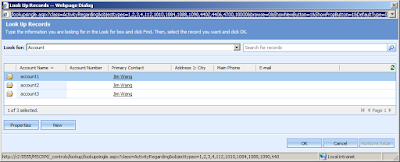


/lookupsingle.aspx?class=ActivityRegarding&objecttypes=1,2,3,4&browse=0&ShowNewButton=1&ShowPropButton=1&DefaultType=0

lookupsingle.aspx has some parameters which can be referenced by our developers, those parameters are:

Objecttypes : Entity code, e.g. Objecttypes = "1, 2" //show account and contact
DefaultType : the default lookup entity, e.g. DefaultType = "2" //default to contact
Browse : bool, 0 = show the "Look for" bar; 1 = browse model, hide the "Look for " bar.
ShowNewButton : bool, 0 = hide the "New" button; 1 = show the "New" button.
ShowPropButton : bool, 0 = hide the "Properties" button; 1 = show the "Properties" button.

In an IFRAME or a ISV solution, if you don't want users to see the 'New' Button, you can just set the URL to:
/lookupsingle.aspx?class=ActivityRegarding&objecttypes=1,2,3,4&browse=0&ShowNewButton=0&ShowPropButton=1&DefaultType=0

It's cool so far! But how about if want to hide the 'New' button in CRM?
You can't just say: crmForm.all.regardingobjectid.ShowNewButton = 0; it doesn't work. But what you can do is in the onLoad() event, use attachEvent method to attach a setadditionalparams event for the regardingobjectid. Again, those methods are all unsupported customisations, however, those are widely used in the Web development.

/*
Function: show/hide the 'New' button of lookup
bShow = 0 : hide the New Button
bShow = 1 : show the New Buton
*/
function NewButton(bShow)
{
return function()
{
crmForm.all.regardingobjectid.AddParam("ShowNewButton", bShow);
}
}
crmForm.all.regardingobjectid.attachEvent("setadditionalparams",NewButton(0));

05 April 2008

Add client-side Microsoft Office Word Spell Checker in CRM Email entity


There are many CRM spell checker add-ons on the Internet, most of those are free, but they are all server-side spell checkers.

Today let's introduce the new client-side Word Spell Checker which uses Microsoft Office Word spell check function. It does give users a familiar feeling and larger database. It also uses Word's spell check settings. So I think users will love it. It has been used for one of our clients live environment for half year, and it has great feedbacks.

As you can see, the client machine must have Microsoft Word installed for using this technique.(My clients are using Microsoft Office Word 2003, I'm not sure if it's compatible with Word 2007, please feel free to test this solution)

The file needs to be modified is: CRMWeb\Activities\email\edit.aspx

You may already recognized that it's an unsupported customization, so please make backups just in case your customization could damage the system and also could be overwrite by Hotfixs/Rollups.

Just simply add a function:


/*  Microsoft Office Word Spelling Check*/
 
function SpellCheck(field)
{
window.frames[field].document.execCommand("Copy");
 textRange = window.frames[field].document.body.createTextRange();
 textRange.execCommand("Copy");
 
 try
 {
   var oWord = new ActiveXObject("Word.Application");
   oWord.Visible = false;
   oWord.Documents.Add();
   oWord.Top = -2000;
   oWord.Selection.Paste();
   oWord.ActiveDocument.CheckSpelling();
   oWord.Selection.WholeStory();
   oWord.Selection.Copy();
   oWord.ActiveDocument.Close(0);
   window.frames[field].focus();
   window.frames[field].document.execCommand("SelectAll");
   window.frames[field].document.execCommand("Paste");
 }
 catch(err)
 {
   alert("Error loading Microsoft Word Spelling Check: " + err);
 }
 finally
 {
   oWord.Quit(0);
 }
 
 alert("Spelling Check Finished!");
 
}

You also need to modify the isv.config.xml fie to call this function:


<Entity name="email">
<ToolBar ValidForCreate="1" ValidForUpdate="1">
<Button Title="Spell Check" ToolTip="Spell Check" Icon="/_imgs/ico_18_home.gif" JavaScript="SpellCheck('descriptionIFrame');" />
</ToolBar>
</Entity>

What the function does is copy the text user typed in the Email body(descriptionIFrame), and paste it to a Word document, the document is unseenable because it has been moved out of the screen(oWord.Top = -2000) , then the function call Word.CheckSpelling() method to check the text just pasted. After correct all words, it will paste the whole text back to the Email body, and close the Word process.

20 May 2007

Integrate CRM with WSS 3.0 Picture Library

I worked for a project which needs integrate CRM with WSS 3.0 picture library.
The requirement was: Each account has it's own picture library in WSS, so the pictures could be use in CRM report etc.
Here's the code:


public partial class _Default : System.Web.UI.Page
{
string accountGUID = "";
protected void Page_Load(object sender, EventArgs e)
{
string entityId = Request.QueryString["oId"];
Guid accountId = (entityId == null) ? (new Guid("00000000-0000-0000-0000-000000000000")) : new Guid(entityId);
accountGUID = accountId.ToString();
string url = "http://WSS:6666/PL/" + accountGUID; // PL is a picture library in WSS 3.0

if (CheckUrl(url))
{
Response.Redirect(url);
}
else
{
Label1.Text = "This account doesn't has a Pictures Library, please create a one for it.";
}
}

public static bool CheckUrl(string url)
{
//check if the url(pictures library) is existing
HttpWebResponse httpResponse = null;

try
{
HttpWebRequest httpRequest = (HttpWebRequest)WebRequest.Create(url);
httpRequest.Credentials = System.Net.CredentialCache.DefaultCredentials;
httpResponse = (HttpWebResponse)httpRequest.GetResponse();
return (httpResponse.StatusCode == System.Net.HttpStatusCode.OK);
}
catch (Exception ex)
{
return false;
}
}

protected void Button1_Click(object sender, EventArgs e)
{
//Response.Redirect("http://WSS:6666/PL/Forms/Upload.aspx?Type=1");
SPSite Site = new SPSite("http://WSS:6666"); //site url
SPWeb Web = Site.OpenWeb();
Site.AllowUnsafeUpdates = true;
Web.AllowUnsafeUpdates = true;
SPFolder rootFolder = Web.GetFolder("PL"); // PL is a picture library in WSS 3.0
rootFolder.SubFolders.Add(accountGUID);
Page_Load(null, null);
}
}