
24 August 2010
Software Advice: 15 Favourites Microsoft Dynamics CRM Industry Solutions
Lauren Carlson has recently posted a blog about the 15 Favourites Microsoft Dynamics CRM Industry Solutions:
Read more: http://www.softwareadvice.com/articles/crm/microsoft-dynamics-crm-industry-solutions-our-20-favorites-1082010/#ixzz0xYTF2cHC
When most industry observers hear customer relationship management (CRM), they think of applications for sales, service and marketing. However, actual CRM software users think of the much more specific functionality required to do business in their industry. For example, sales software used by a pharmaceutical rep to track FDA-related information will vary greatly from that used by a cattle rancher to track their herd. Yes, there’s an app for that.
To meet these unique industry requirements, Microsoft has called on hundreds of partners that resell, customize and implement Microsoft Dynamics CRM. These value-added resellers (VARs) and independent software vendors (ISVs) are extending the core Dynamics CRM applications to meet the unique needs of companies in a range of vertical markets. There are now over 750 certified industry solutions built on Microsoft Dynamics CRM. The breadth of industry solutions available is impressive – a testament to the scope and sophistication of the Microsoft partner channel.
To demonstrate the specificity of these solutions, we decided to highlight some of our favorite Microsoft Dynamics CRM partner solutions. For easy navigation, we’ve linked each industry to its corresponding solution:
| Advertising | Financial Services | Non-Profit |
| Agriculture | Healthcare | Pharmaceuticals |
| Automotive | Hospitality/Travel | Public Sector |
| Construction | Insurance | Real Estate |
| Distribution | Legal | Retail |
Read more: http://www.softwareadvice.com/articles/crm/microsoft-dynamics-crm-industry-solutions-our-20-favorites-1082010/#ixzz0xYTF2cHC
17 July 2010
Register to receive a notification of the Microsoft Dynamics CRM 2011 Public Beta
Register to receive a notification of the Microsoft Dynamics CRM 2011 Public Beta
From Microsoft Website: "As announced at the Microsoft Worldwide Partner Conference on July 12, 2010, Microsoft Dynamics CRM 2011 - formerly codenamed "CRM5" - will be publicly available as a beta release in September 2010 for both online and on-premises deployments.
The Power of Productivity
Microsoft Dynamics CRM 2011 delivers "The Power of Productivity" through familiar, intelligent and connectedexperiences for people inside and outside an organization.
......"
08 March 2010
Download: CRM 4.0 Diagnostics Tool - alternative link
Just in case you find the original link for the CRM 4.0 Diagnostics Tool has been removed, you can download it from here: CrmDiagTool4.zip
Also use the Stunnware CrmTraceLogViewer.zip to analyse a trace file.
KB907490: How to enable tracing in Microsoft Dynamics CRM
Also use the Stunnware CrmTraceLogViewer.zip to analyse a trace file.
KB907490: How to enable tracing in Microsoft Dynamics CRM
13 February 2010
Happy Chinese New Year! 2010 - The Year of The Tiger
 p.s.: Ancient Chinese believe that the markings on the forehead of tigers resemble the Chinese character for "Wang", or King, which is my family name. ;-)
08 January 2010
SharePoint 2010 Beta Learning Path

My first project in the new year is about SharePoint 2010 development - it's new to everyone. Although having experience on SharePoint 2003/2007, the best plan is keep my knowledge up to date, which is the I.T. spirit I like!
First thing first, get myself a 64bit virtualisable laptop computer with 4GB RAM to set up a development environment:
1. Install Windows Server 2008 R2 Enterprise 64bit version with Hyper-V;
2. Install Hyper-V and Web Server role services;
3. Install SharePoint Foundation 2010 on the Stand Along Installation;
4. Install Office 2010 and SharePoint Designer 2010;
5. Install Visual Studio 2010.
For the performance issue, I choose to install the SharePoint Server 2010 on a Hyper-V image:
6. Create a new image on Hyper-V, install Windows Server 2008 R2 on that image with SQL Server 2008 R2 and SharePoint Server 2010.
So now I have both SharePoint 2010 Foundation and Serve development environment. Next, find some free online training materials.
What I have looked at are (at January 2010):
MSDEV: A First Look at Microsoft SharePoint Server 2010
Microsoft SharePoint 2010: Overview for TDM's
Microsoft SharePoint 2010: Overview for Developers
Microsoft SharePoint 2010: Overview for Implementers
Microsoft SharePoint 2010: Developing with Visual Studio 2010
Microsoft SharePoint 2010: Developing with SharePoint Designer
MSDN: Get Started Developing on SharePoint 2010
Module 1: Getting Started: Building Web Parts in SharePoint 2010
Module 2: What Developers Need to Know About SharePoint 2010
Module 3: Building Blocks for Web Part Development in SharePoint 2010
Module 4: Accessing SharePoint 2010 Data and Objects with Server-Side APIs
Module 5: Accessing SharePoint 2010 Data and Objects with Client-Side APIs
Module 6: Accessing External Data with Business Connectivity Services in SharePoint 2010
Module 7: Developing Business Processes with SharePoint 2010 Workflows
Module 8: Creating Silverlight User Interfaces for SharePoint 2010 Solutions
Module 9: Sandboxed Solutions for Web Parts in SharePoint 2010
Module 10: Creating Dialog Boxes and Ribbon Controls for SharePoint 2010
CHANNEL9: SharePoint 2010 Developer
SharePoint 2010 Developer Roadmap
Visual Studio 2010 Tools for SharePoint 2010
UI Enhancements
Lists and Schemas
LINQ to SharePoint
Client Object Model
Workflow
Services Architecture
Accessing External Data
Enterprise Content Management
Extending Search
PerformancePoint Services
Sandboxed Solutions
SharePoint 2010 Security
Microsoft download:
SharePoint 2010 Beta Developer Training Kit
SharePoint 2010 Reference: Software Development Kit
SharePoint 2010: Professional Developer Evaluation Guide and Walkthroughs
SharePoint 2010: Getting Started with Development on SharePoint 2010 Hands-on Labs in C# and Visual Basic
Online resources:
SharePoint 2010 Forum
SharePoint Developer Center
Microsoft SharePoint Team Blog
Microsoft SharePoint Developer Documentation Team Blog
I think it's enough for me to start working on SharePoint 2010.
Happy New Year!
10 December 2009
Microsoft Dynamics CRM 4 Integration Unleashed
Last month, Pearson(Sams Publishing) sent me a book to review. It's the 《Microsoft Dynamics CRM 4 Integration Unleashed》written by Marc and Rajya.
The book covers many areas that you can think of about the CRM 4 integration: Infrastructure Design; Extending CRM; Silverlight Integration; SharePoint Integration; BI; Digital Phone Integration; Master Data Management; Social Network Integration; Mapping Technologies; CRM 4.0 Accelerators; SCOM; VSTS; BizTalk Integration; Azure; Scribe Integration and more.
I really like the fact that the book provides some real world examples and step by step through integrating Dynamics CRM with other products/technologies, it's helpful for CRM architects and developers to get an overview or even in details about CRM Integration.

The book covers many areas that you can think of about the CRM 4 integration: Infrastructure Design; Extending CRM; Silverlight Integration; SharePoint Integration; BI; Digital Phone Integration; Master Data Management; Social Network Integration; Mapping Technologies; CRM 4.0 Accelerators; SCOM; VSTS; BizTalk Integration; Azure; Scribe Integration and more.
I really like the fact that the book provides some real world examples and step by step through integrating Dynamics CRM with other products/technologies, it's helpful for CRM architects and developers to get an overview or even in details about CRM Integration.

28 November 2009
Install SharePoint 2010 on a VM environment
When SharePoint 2010 Beta released couple weeks ago, I tried to install it on a VM: What I got for this VM are: Windows Server 2008 R2, SQL 2008 R2(CTP), 1.5GB RAM, etc.
I selected the "Standalone" install, the installation process took about 15 minutes. When it completed, I ran the Configuration Wizard, it failed on the step 5:
Failed to register SharePoint services.
An exception of type System.ServiceProcess.TimeoutException was thrown. Additional exception information: Time out has expired and the operation has not been completed.
System.ServiceProcess.TimeoutException: Time out has expired and the operation has not been completed.
I Googled it, it seems like the RAM is far not enough(minimum 4GB); I also found that modify registry key doesn't help in my case.
The work around I found: Re-Install SharePoint 2010 by using "Server Farm" >> "Complete" option, then both installation and configuration went successful! That's good enough for me to test things. ;-)

I selected the "Standalone" install, the installation process took about 15 minutes. When it completed, I ran the Configuration Wizard, it failed on the step 5:
Failed to register SharePoint services.
An exception of type System.ServiceProcess.TimeoutException was thrown. Additional exception information: Time out has expired and the operation has not been completed.
System.ServiceProcess.TimeoutException: Time out has expired and the operation has not been completed.
I Googled it, it seems like the RAM is far not enough(minimum 4GB); I also found that modify registry key doesn't help in my case.
The work around I found: Re-Install SharePoint 2010 by using "Server Farm" >> "Complete" option, then both installation and configuration went successful! That's good enough for me to test things. ;-)

24 October 2009
Change the lookup view on Many-to-Many relationship
The N:N lookup view in CRM 4.0 is very basic: it only shows the primary field on the lookup entity. Say if you create a N:N relationship for Account and Contact, the lookup view looks like:
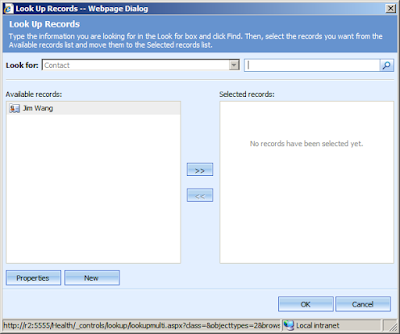
It's not convenient if you want to see more details of the lookup records. So, how can we change it?
How about if we put the standard view(Active Contacts View, Contact Lookup View, etc) on the left panel - Sounds great!
The solution includes two parts:
1. A customized lookupmulti.aspx in the ISV folder;
- Used for generating the lookup view.
2. Jscript code on the referencing entity(which is 'Account' in this case )
- Used for passing parameters to the custom ASPX page;
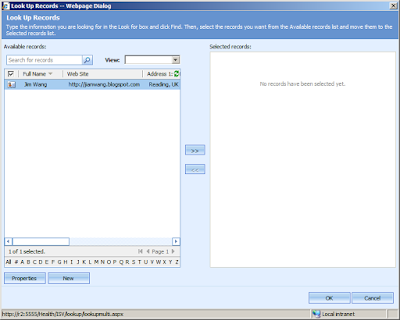
First of all, create a new folder under the: \CRMWeb\ISV\
Save the below code as a ASPX file in that folder, so you got, for instance: \CRMWeb\ISV\lookup\lookupmulti.aspx
Put the below code into Account.Onload(), you need to replace the: nnId, lookupTypeCode, lookupViewId to yours.
Notice:

It's not convenient if you want to see more details of the lookup records. So, how can we change it?
How about if we put the standard view(Active Contacts View, Contact Lookup View, etc) on the left panel - Sounds great!
The solution includes two parts:
1. A customized lookupmulti.aspx in the ISV folder;
- Used for generating the lookup view.
2. Jscript code on the referencing entity(which is 'Account' in this case )
- Used for passing parameters to the custom ASPX page;

First of all, create a new folder under the: \CRMWeb\ISV\
Save the below code as a ASPX file in that folder, so you got, for instance: \CRMWeb\ISV\lookup\lookupmulti.aspx
<!--
-- Show entity's standard View in a N:N LookupMulti dialog window.
-- Jim Wang @ October 2009
-- http://jianwang.blogspot.com
-- http://www.mscrm.cn
-->
<html><head><META HTTP-EQUIV="Content-Type" CONTENT="text/html; CHARSET=utf-8">
<title>Look Up Records</title>
<script type="text/javascript">
 var viewDoc = this;
 var _mode = 4;
 var IS_PATHBASEDURLS = true;
 var ORG_UNIQUE_NAME = window.dialogArguments.split("/")[1];
 var iTypeCode = window.dialogArguments.substring(window.dialogArguments.indexOf("etc=") + 4, window.dialogArguments.indexOf("&viewid="));
</script>
<script type="text/javascript" src="/_static/_common/scripts/encodedecode.js"></script>
<script type="text/javascript" src="/_static/_controls/util/util.js"></script>
<script type="text/javascript" src="/_static/_common/scripts/global.js"></script>
<script type="text/javascript" src="/_static/_common/scripts/xmlutil.js"></script>
<script type="text/javascript" src="/_static/_controls/remotecommands/remotecommand.js"></script>
<script type="text/javascript" src="/_common/windowinformation/windowinformation.aspx"></script>
<script type="text/javascript" src="/_static/_controls/lookup/lookupdialogs.js"></script>
<script type="text/javascript" src="/_static/_forms/addrelated.js"></script>
<script type="text/javascript" src="/_static/_common/scripts/details.js"></script>
<script type="text/javascript" src="/_static/_common/scripts/select.js"></script>
<script type="text/javascript" src="/_static/_common/scripts/presence.js"></script>
<script type="text/javascript" src="/_static/_controls/number/number.js"></script>
<script type="text/javascript" src="/_static/_controls/lookup/lookup.js"></script>
<link rel="stylesheet" type="text/css" href="/_common/styles/global.css.aspx?lcid=1033" />
<link rel="stylesheet" type="text/css" href="/_common/styles/global-styles.css.aspx?lcid=1033" />
<link rel="stylesheet" type="text/css" href="/_common/styles/global-dynamic-styles.css.aspx?lcid=1033" />
<link rel="stylesheet" type="text/css" href="/_common/styles/fonts.aspx?lcid=1033" />
<link rel="stylesheet" type="text/css" href="/_forms/controls/form.css.aspx?lcid=1033" />
<link rel="stylesheet" type="text/css" href="/_forms/controls/controls.css.aspx?lcid=1033" />
<link rel="stylesheet" type="text/css" href="/_common/styles/dialogs.css.aspx?lcid=1033" />
<link rel="stylesheet" type="text/css" href="/_controls/lookup/lookupdialogs.css.aspx?lcid=1033" />
<link rel="stylesheet" type="text/css" href="/_common/styles/select.css.aspx?lcid=1033" />
<link rel="stylesheet" type="text/css" href="/_controls/notifications/notifications.css.aspx?lcid=1033" />
</head><body><div style="width:100%; height:100%; overflow:auto"><table style="width:100%; height:100%;" cellspacing="0" cellpadding="0"><tr><td colspan="2" class="ms-crm-Dialog-Header">
<div class="ms-crm-Dialog-Header-Title" id="DlgHdTitle">Look Up Records</div><div class="ms-crm-Dialog-Header-Desc" id="DlgHdDesc">Type the information you are looking for in the Look for box and click Find. Then, select the records you want from the Available records list and move them to the Selected records list.</div></td></tr>
<tr><td colspan="2" style="height:100%;"><div class="ms-crm-Dialog-Main" ><div id="divWarning" style="height:100%;">
<script language="JavaScript">

 function initFrame() {
     viewDoc = document.getElementById("frmResults").contentWindow.document;
     tblResults = viewDoc.getElementById("crmGrid").InnerGrid;
     if (tblResults == undefined) {
         return;
     }
 }

 function createNew() {
     openObj(iTypeCode, null, null);
 }

 function applychanges() {
     window.returnValue = buildReturnValue(tblSelected.rows);
     window.close();
 }

 function cancel() {
     window.close();
 }

 function window.onload() {
     if (window.dialogArguments) {
         document.getElementById("frmResults").src = window.dialogArguments;
         document.getElementById("frmResults").onreadystatechange = resultsReady;
     }
     else {
         alert("No arguments found.");
         return;
     }
 }

 function resultsReady() {
     if (frmResults.document.readyState == "complete") {
         initFrame();
         viewDoc.body.scroll = "no";
         viewDoc.body.style.padding = "0px";
         viewDoc.body.style.border = "1px";
         viewDoc.body.firstChild.firstChild.firstChild.firstChild.bgColor = "#E3EFFF";
         viewDoc.getElementById("crmMenuBar").parentNode.parentNode.removeNode(true);
         viewDoc.getElementById("crmGrid").onpropertychange = function() { setTimeout(onAfterChange, 100); }

         setNavigationState();
     }
 }

 function onAfterChange() {
     initFrame();
     setNavigationState();
 }

 function removeSelected() {
     var items = tblSelected.selectedItems;
     for (var i = 0; i < items.length; i++) {
         items[i].removeNode(true)
     }

     items.splice(0, items.length);
     if (tblSelected.rows.length > 0) {
         selectItem(tblSelected, tblSelected.rows[0], true);
     }
     setNavigationState();
 }

 function duplicateSelection(oid) {
     var len = tblSelected.rows.length;
     for (var i = 0; i < len; i++) {
         if (tblSelected.rows[i].oid == oid) {
             return true;
         }
     }
     return false;
 }

 function appendItem(id, type, html, originalItem) {
     var tr = tblSelected.insertRow();
     tr.oid = id;
     tr.otype = type;
     tr.originalItem = originalItem;

     var td = tr.insertCell();
     td.className = "sel";
     td.noWrap = true;
     td.innerHTML = html;

     if (tr.rowIndex == 0) {
         selectItem(tblSelected, tr, false);
     }
 }

 function appendSelected() {
     initFrame();
     var items = tblResults.SelectedRecords;
     if (items) {
         var len = items.length;
         var html = "<TD class=ms-crm-List-DataCell align=middle><IMG style='CURSOR: hand' alt='Click to preview' src='/_imgs/grid/row_selected.gif'> </TD>";

         for (var i = 0; i < len; i++) {
             var o = items[i];

             if (!duplicateSelection(o[0])) {

                 appendItem(o[0], o[1], o[3].innerHTML.indexOf("row_selected.gif") == -1 ? html + o[3].innerHTML : o[3].innerHTML, null);
             }
         }
         setNavigationState();
     }
 }

 function setNavigationState() {
     if (tblResults != undefined) {
         if (tblResults.SelectedRecords != null && tblResults.SelectedRecords.length != null && tblResults.SelectedRecords.length > 0) {
             btnProperties.disabled = false;
             btnAppend.disabled = false;
         }
         else {
             btnProperties.disabled = true;
             btnAppend.disabled = true;
         }
         btnRemove.disabled = (tblSelected.rows.length == 0);
         tblNoRecords.runtimeStyle.display = (tblSelected.rows.length == 0 ? "" : "none");
     }
 }

 function showProperties() {
     initFrame();
     var items = tblResults.SelectedRecords;
     if (items == null || items.length == null) {
         return;
     }
     if (items.length == 0) {

         alert("You must select one object.");
     }
     else if (items.length > 1) {
         alert("You must only select one object.");
     }
     else {
         var nWidth = 560;
         var nHeight = 525;
         var oWindowInfo = GetWindowInformation(items[0][1]);
         if (oWindowInfo != null) {
             nWidth = oWindowInfo.Width;
             nHeight = oWindowInfo.Height;
         }

         switch (Number(items[0][1])) {
             case Service:
                 openStdWin(prependOrgName("/sm/services/readonly.aspx?objTypeCode=" + items[0][1] + "&id=" + items[0][0]), "readonly" + buildWinName(items[0][0]), nWidth, nHeight);
                 break;
             case Workflow:
                 openObj(items[0][1], items[0][0]);
                 break;
             case ImportMap:
                 openStdWin(prependOrgName("/tools/managemaps/readonly.aspx?objTypeCode=" + items[0][1] + "&id=" + items[0][0]), "readonly" + buildWinName(items[0][0]), nWidth, nHeight);
                 break;
             default:
                 openStdWin(prependOrgName("/_forms/readonly/readonly.aspx?objTypeCode=" + items[0][1] + "&id=" + items[0][0]), "readonly" + buildWinName(items[0][0]), nWidth, nHeight);
                 break;
         }
     }
 }

</script>

<table cellspacing="0" cellpadding="0" width="100%" height="100%">
<td>
<table height="100%" width="100%" id="tblFind" cellpadding="0" cellspacing="0">
<tr height="20">
<td>Available records:</td>
<td></td>
<td>Selected records:</td>
</tr>
<tr>
<td width="45%">

<iframe scrolling="no" class="ms-crm-Dialog-Lookup-Results" id="frmResults" ></iframe>

</td>
<td width="60" align="center">
<button id="btnAppend"disabled="disabled" style="width: 40px;" onclick="appendSelected()" title="Add the selected record">>></button>
<p>
<button id="btnRemove" disabled="disabled" style="width: 40px;" onclick="removeSelected();" title="Remove the selected record"><<</button>
</td>
<td>
<div id="rtnObjList" class="ms-crm-Dialog-Lookup-Objects" onkeydown="listKeyDown(tblSelected)" onfocusin="focusSelectedItems(tblSelected, true);" onfocusout="focusSelectedItems(tblSelected, false);">

<table hidefocus="true" tabindex="0" id="tblSelected" cellpadding="2" cellspacing="0" width="100%" onclick="clickItem( this )" ondblclick="removeSelected()"></table>

<table class="ms-crm-Dialog-Lookup-InlineMsg" id="tblNoRecords">
<tr>
<td class="ms-crm-Dialog-Lookup-InlineMsg" align="center">No records have been selected yet.</td>
</tr>
</table>
</div>
</td>
</tr>
<tr height="20" style="padding-top: 10px;">
<td colspan="3" nowrap>
<button id="btnProperties" disabled="disabled" onclick="showProperties();" class="ms-crm-Button" Title="View the selected record's properties" >Properties</button><span style="width: 5px;"></span>
<button id="btnNew" onclick="createNew();" class="ms-crm-Button" Title="Create a new record">New</button>
</td>
</tr>
</table>
</td>
</tr>
</table>
</div></div>
<div id='divFillBg' style='display:none;position:absolute;top:80px;left:20px;height:23px;width:355px;background-color:#ffffff;'> </div>
<div id='divFill' style='display:none;position:absolute;top:80px;left:20px;height:23px;width:0px;filter: progid:DXImageTransform.Microsoft.Gradient(GradientType=0, StartColorStr=#00ff00, EndColorStr=#00cc00);'> </div>
<div id='divStatus' style='display:none;position:absolute;top:80px;left:19px;height:23px;width:357px;'><img alt='' src='/_imgs/statusbar.gif' height='23' width='357'></div></td></tr><tr><td class="ms-crm-Dialog-Footer ms-crm-Dialog-Footer-Left"> </td>
<td class="ms-crm-Dialog-Footer ms-crm-Dialog-Footer-Right"><button id="butBegin" onclick="applychanges();" class="ms-crm-Button">OK</button> <button id="cmdDialogCancel" onclick="cancel();" class="ms-crm-Button">Cancel</button></td></tr></table></div>

</body>
</html>
Put the below code into Account.Onload(), you need to replace the: nnId, lookupTypeCode, lookupViewId to yours.
var nnId = "new_account_contact"; // entity N:N relationship id
var lookupTypeCode = 2; // entity type code
var lookupViewId = "A2D479C5-53E3-4C69-ADDD-802327E67A0D"; // the view id of referenced entity

var lookupSrc = "/" + ORG_UNIQUE_NAME + "/ISV/lookup/lookupmulti.aspx";
var lookupArg = "/" + ORG_UNIQUE_NAME + "/_root/homepage.aspx?etc=" + lookupTypeCode +"&viewid=" + lookupViewId;

var lookupEntityTypeCode;
var navId = document.getElementById("nav" + nnId);
if (navId != null)
{
 var la = navId.onclick.toString();
 la = la.substring(la.indexOf("loadArea"), la.indexOf(";"));

 navId.onclick = function()
 {
     eval(la);

     var areaId = document.getElementById("area" + nnId + "Frame");
     if(areaId != null)
     {
         areaId.onreadystatechange = function()
         {
             if (areaId.readyState == "complete")
             {
                 var frame = frames[window.event.srcElement.id];
                 var li = frame.document.getElementsByTagName("li");

                 for (var i = 0; i < li.length; i++)
                 {
                     var action = li[i].getAttribute("action");
                     if(action != null && action.indexOf(relId) > 1)
                     {
                         lookupEntityTypeCode = action.substring(action.indexOf("\(")+1, action.indexOf(","));
                         li[i].onclick = CustomLookup;
                         break;
                     }
                 }
             }
         }
     }
 }
}

function CustomLookup()
{
 var lookupItems = window.showModalDialog(lookupSrc, lookupArg, "dialogWidth:800px; dialogHeight:600px;");

 if (lookupItems)  // This is the CRM internal JS funciton on \_static\_grid\action.js
 {
     if ( lookupItems.items.length > 0 )
     {
         AssociateObjects( crmFormSubmit.crmFormSubmitObjectType.value, crmFormSubmit.crmFormSubmitId.value, lookupEntityTypeCode, lookupItems, true, null, nnId);
     }
 }
}
Notice:
- This is an unsupported customization which does use CRM 4.0 internal functions;
- Tested on CRM 4.0 Update Rollup 7.
12 September 2009
CRM ISV Add-On : The entry 'ScriptModule' has already been added
I tested a CRM 4.0 add-on (ISV-A) last week, the default ASPX page generated an error:
Parser Error Message: The entry 'ScriptModule' has already been added.
<add name="ScriptModule" type="System.Web.Handlers.ScriptModule, System.Web.Extensions, Version=3.5.0.0, Culture=neutral, PublicKeyToken=31BF3856AD364E35">
</httpmodules>
</SYSTEM.WEB>
The add-on was located under the folder: CRMWeb\ISV\MyAddon
Of cause it inherits settings from CRM's root web.config: in which the ScriptModule has been added by another ISV's (ISV-B) add-on(it shouldn't do it at all).
But if I remove the ScriptModule from ISV-A's web.config, the error changed to:
Unable to cast object of type 'System.Web.Configuration.ScriptingAuthenticationServiceSection' to type 'System.Web.Configuration.ScriptingAuthenticationServiceSection'.
That's because the .Net version of ScriptModule are different between ISV-A and ISV-B's, so we have to stop ScriptModule(ISV-A's) inheriting from CRM's root web.config.
So that what I need to do on ISV-A's web.config:
Just before the ScriptModule, add a <remove> tag, which will remove the inherited setting:
<remove name="ScriptModule">
<add name="ScriptModule" type="System.Web.Handlers.ScriptModule, System.Web.Extensions, Version=3.5.0.0, Culture=neutral, PublicKeyToken=31BF3856AD364E35">
Parser Error Message: The entry 'ScriptModule' has already been added.
<add name="ScriptModule" type="System.Web.Handlers.ScriptModule, System.Web.Extensions, Version=3.5.0.0, Culture=neutral, PublicKeyToken=31BF3856AD364E35">
</httpmodules>
</SYSTEM.WEB>
The add-on was located under the folder: CRMWeb\ISV\MyAddon
Of cause it inherits settings from CRM's root web.config: in which the ScriptModule has been added by another ISV's (ISV-B) add-on(it shouldn't do it at all).
But if I remove the ScriptModule from ISV-A's web.config, the error changed to:
Unable to cast object of type 'System.Web.Configuration.ScriptingAuthenticationServiceSection' to type 'System.Web.Configuration.ScriptingAuthenticationServiceSection'.
That's because the .Net version of ScriptModule are different between ISV-A and ISV-B's, so we have to stop ScriptModule(ISV-A's) inheriting from CRM's root web.config.
So that what I need to do on ISV-A's web.config:
Just before the ScriptModule, add a <remove> tag, which will remove the inherited setting:
<remove name="ScriptModule">
<add name="ScriptModule" type="System.Web.Handlers.ScriptModule, System.Web.Extensions, Version=3.5.0.0, Culture=neutral, PublicKeyToken=31BF3856AD364E35">
Subscribe to:
Posts (Atom)